No tracking · No ads · 100% on device

Train smart.
Track what matters.

Volume, recovery, strength standards adjusted for your age. Built for lifters who track. Your data stays on your phone.

iOS 17+
14-day free trial
DE / EN
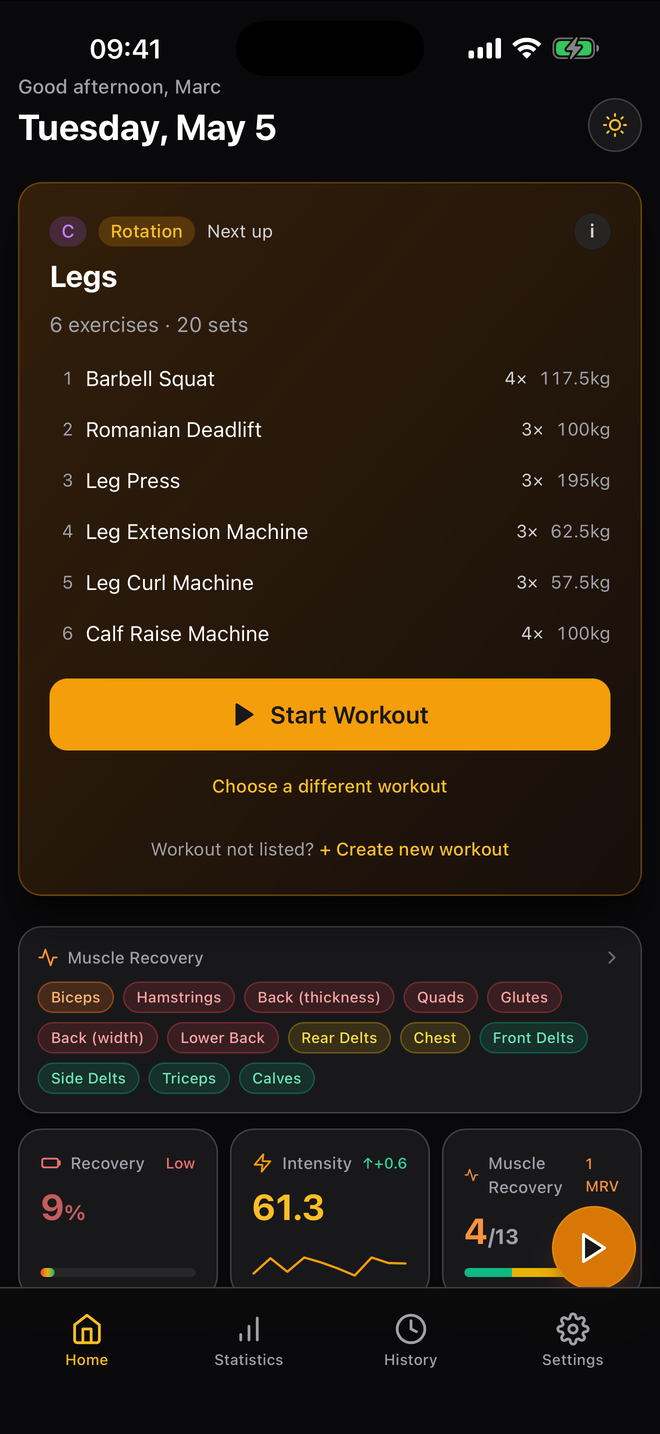
Iron Progress dashboard with next workout, recovery and intensity KPIs
102
Built-in exercises
0
Trackers · 0 SDKs · 0 ads
14
Days Pro free
100%
Works offline

Why Iron Progress

Numbers you can train with.

Every chart on screen has to earn its spot. If a number doesn't help you decide what to do next session, it doesn't make it in.

On the gym floor

Logging that gets out of your way.

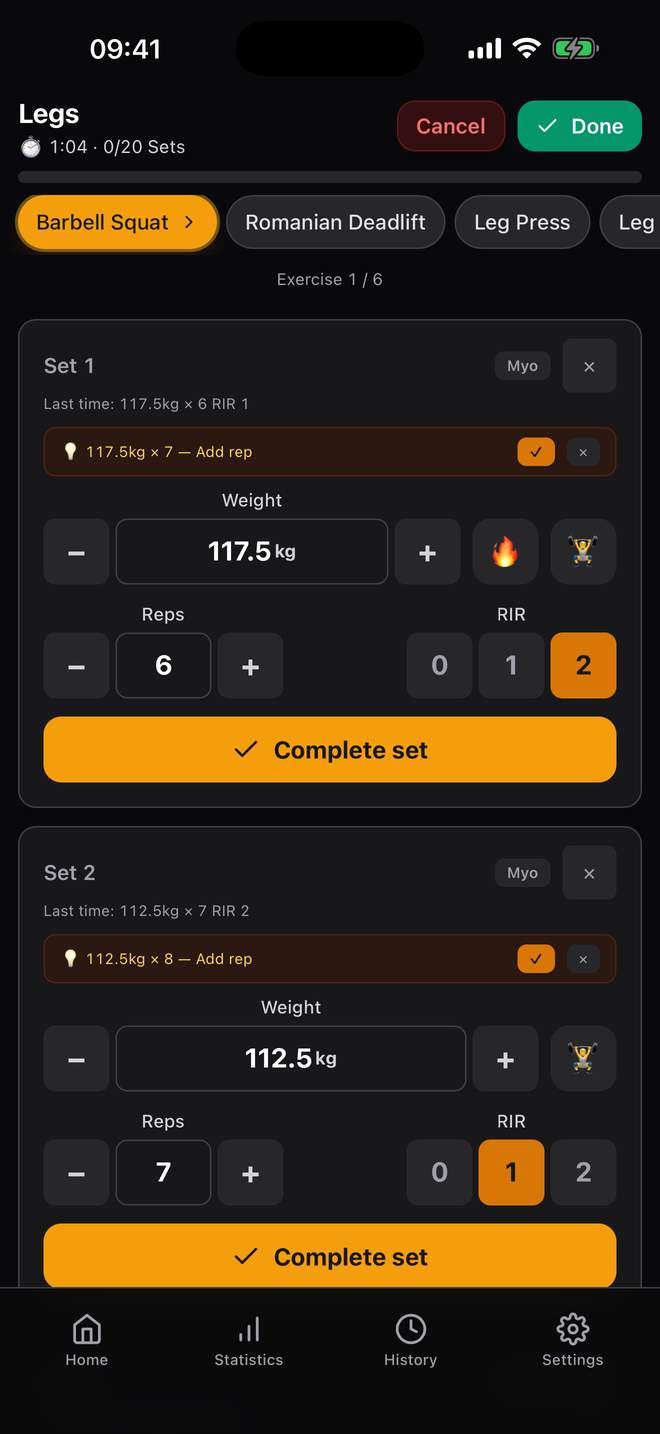
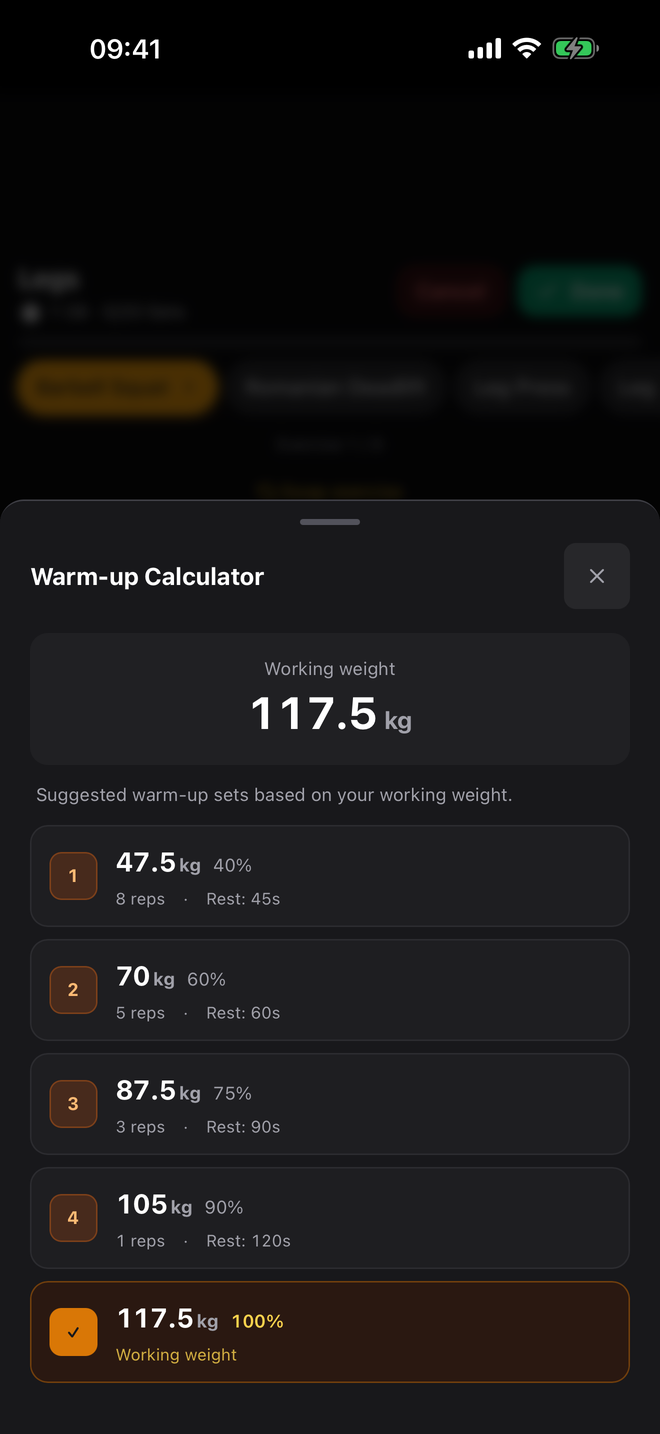
Big tap targets. RIR per set. Drop sets and myo-reps with one tap. A warm-up calculator that does the math while you load the bar.

  • Plate calculator & warm-up sets

    40/60/75/90% ramp with rest times suggested per set.

  • Audio cues even on a locked screen

    Voice tells you the next set's weight × reps × RIR. Generated on-device, no servers.

  • Supersets, drop sets, myo-reps

    Native protocol support, not just notes in a comment field.

Active workout screen with set logging and RIR
Warm-up calculator with ramp sets
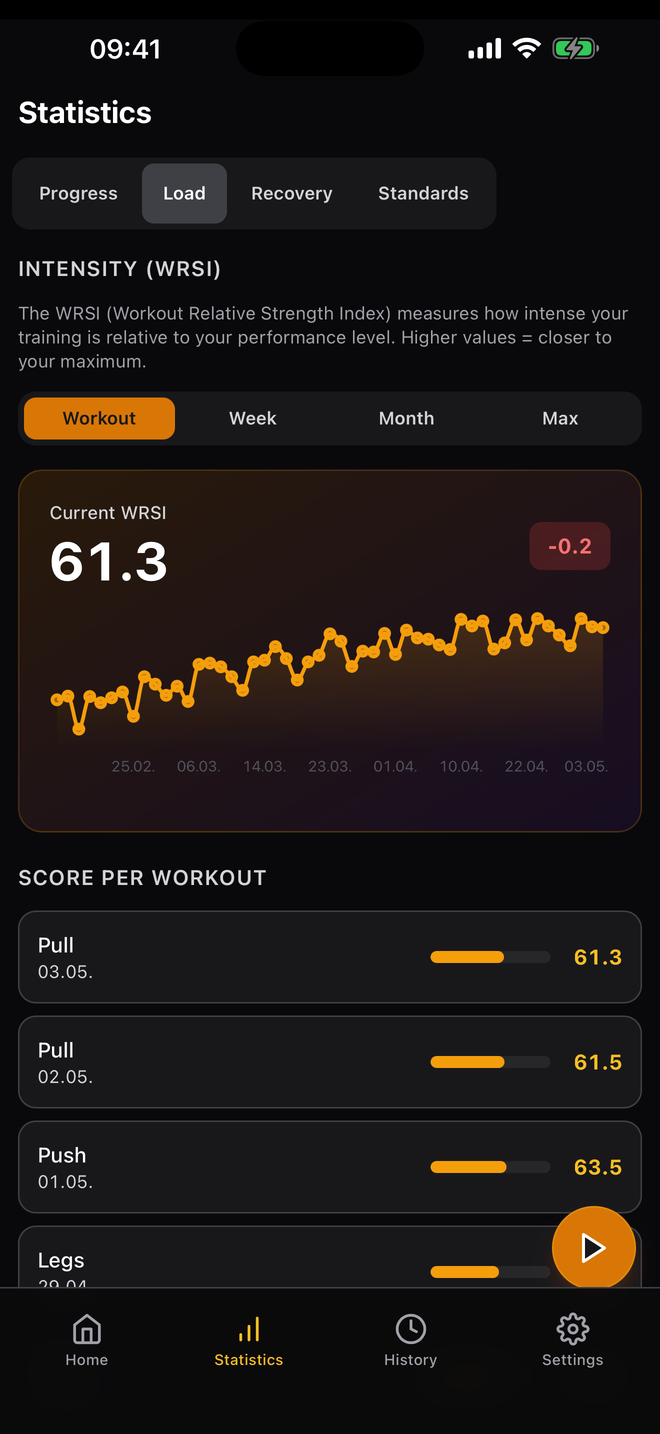
WRSI workout intensity trend
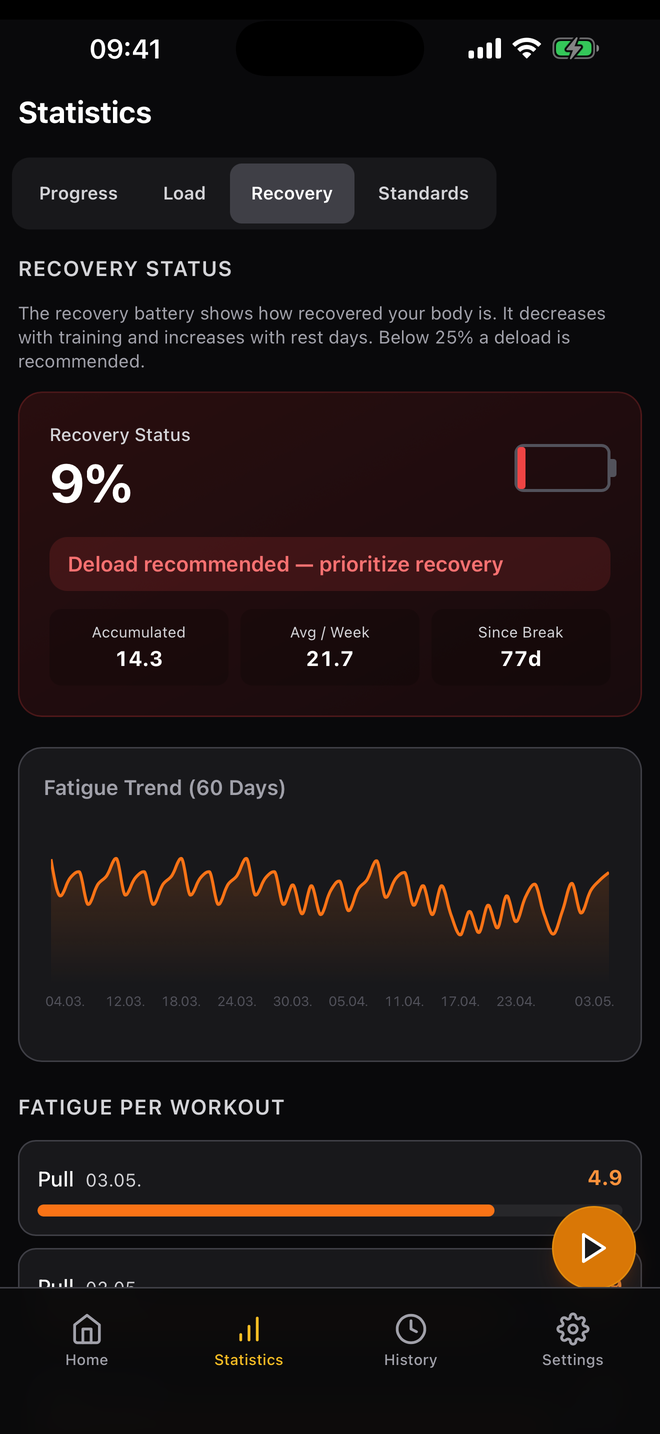
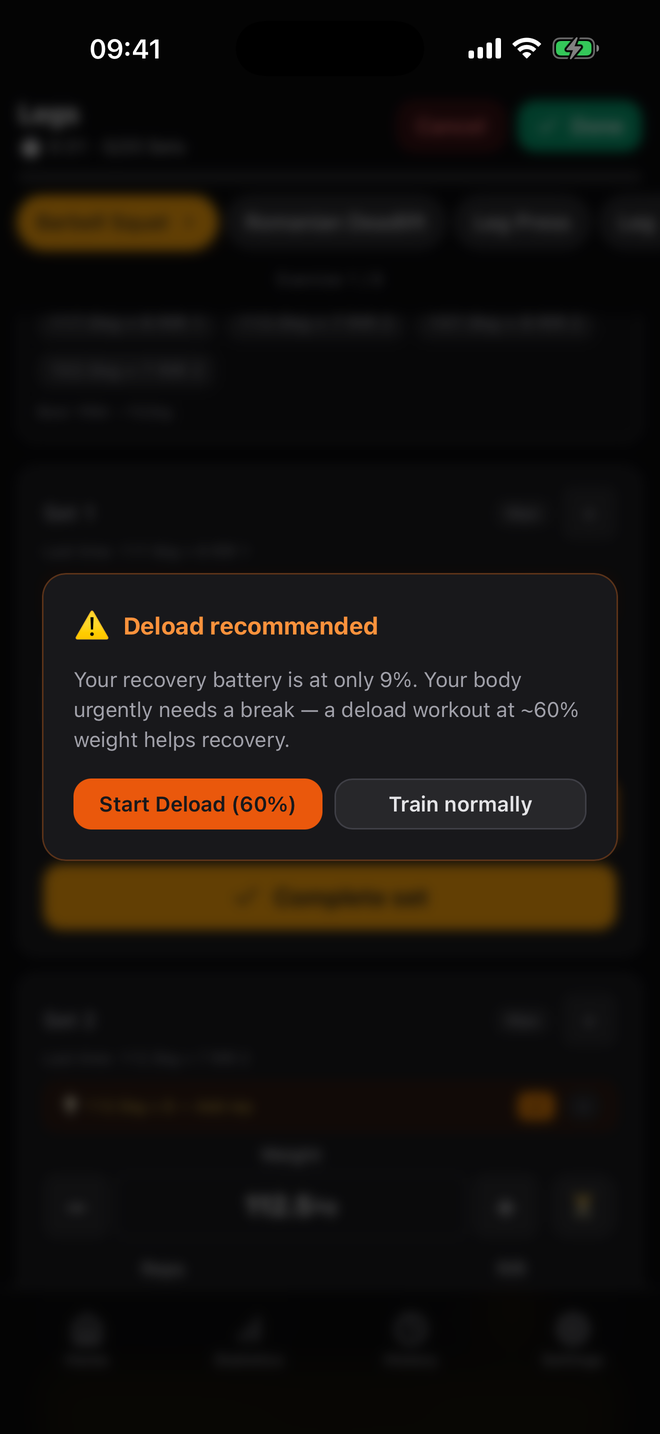
Recovery battery at 9%, deload recommended
Stats that mean something

WRSI, fatigue trend and a recovery battery.

The WRSI (Workout Relative Strength Index) compares each session to your maximum. The 5-factor recovery model warns you before you over-reach. Volume Landmarks (MEV / MAV / MRV) per muscle group keep your weekly programming honest.

WRSI

Per-workout intensity vs. your own max.

MEV/MAV/MRV

Renaissance-style volume landmarks.

Deload

Auto-suggested at 60% when fatigue spikes.

Heatmap

Per-muscle recovery readiness on the home screen.

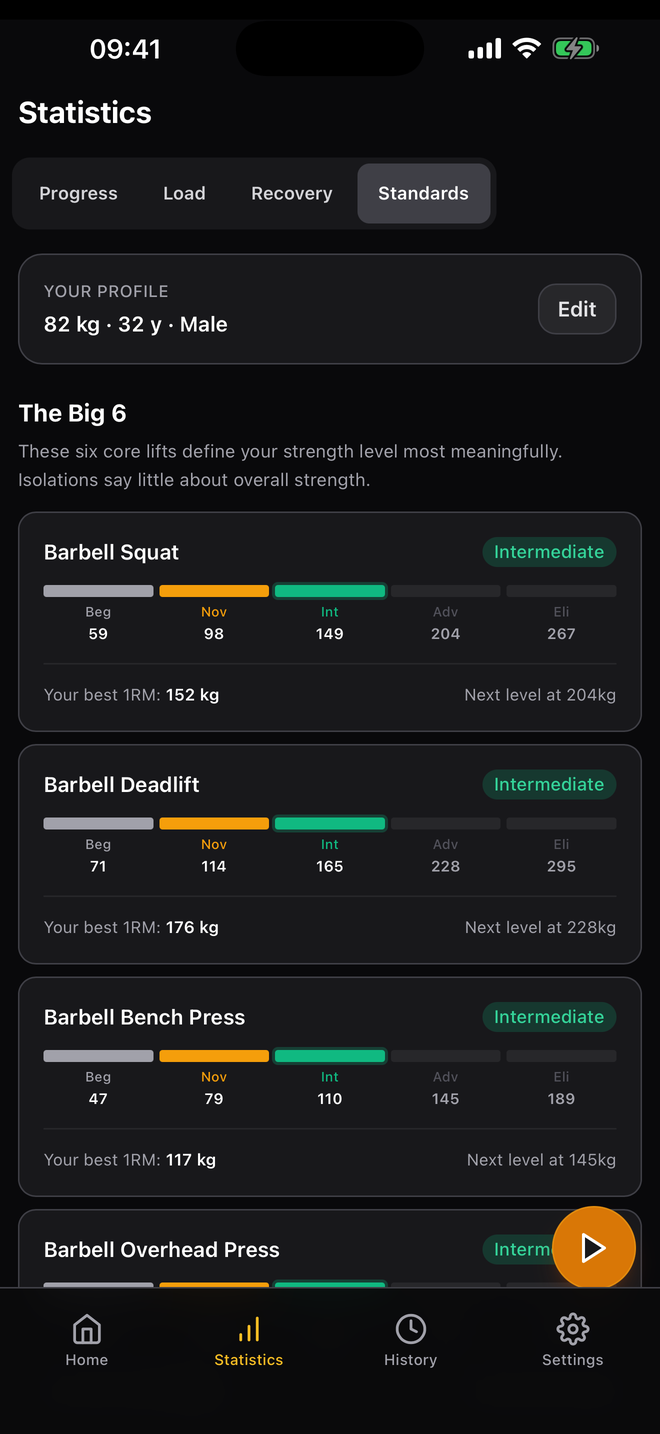
Real strength standards

Beginner to Elite, adjusted for your age and bodyweight.

Most apps treat a 90 kg bench as the same accomplishment for a 22-year-old and a 55-year-old. We don't. Iron Progress factors in age curves and bodyweight ratios so 'Intermediate' actually means something.

Beginner Novice Intermediate Advanced Elite

"The Big 6": Squat, Deadlift, Bench, Overhead, Row, Pull-up. The lifts that say something about overall strength. Isolations are tracked separately.

Strength standards screen showing Beg/Nov/Int/Adv/Eli levels
Deload recommendation modal in workout screen
Smart coaching

Suggestions you can ignore — but probably shouldn't.

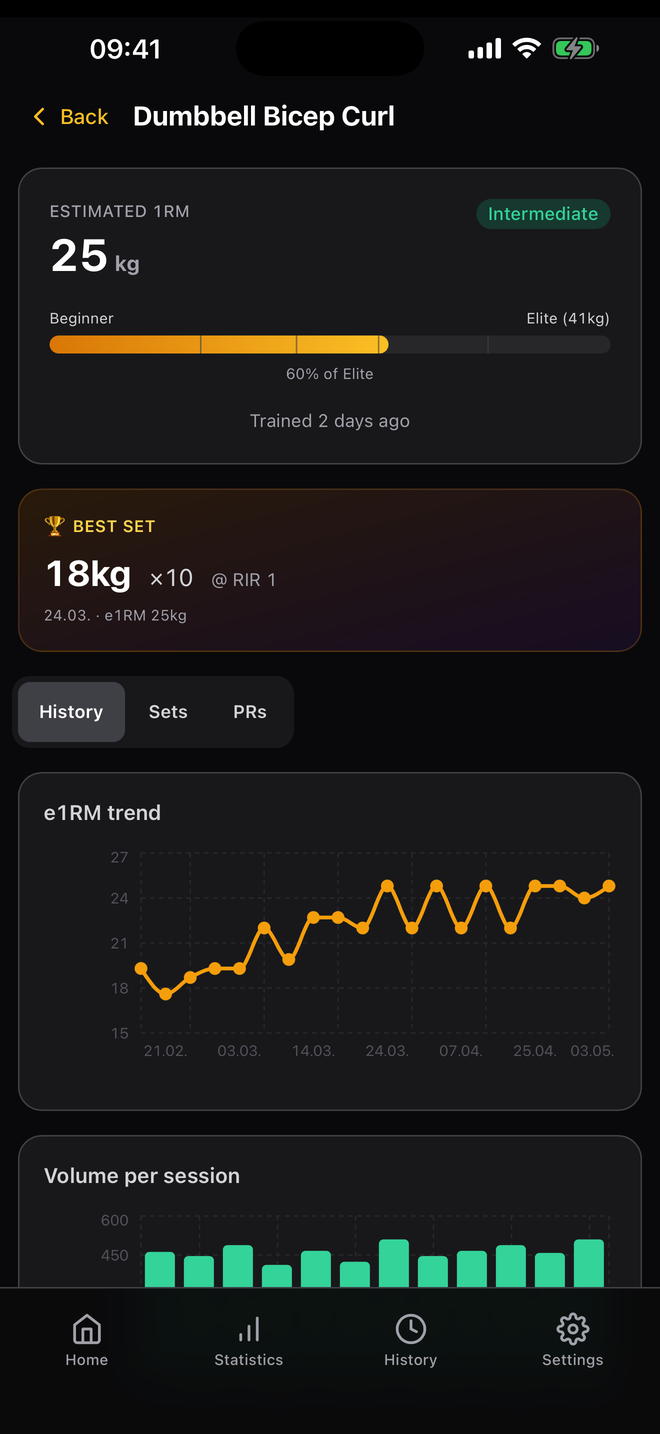
Progression suggestions per exercise based on your last sessions. Deload advisor when accumulated fatigue says enough. Exercise deep-dives with e1RM trend, best sets and PR breakdown.

  • Per-exercise progression ribbon (+0.5kg, +1 rep, hold)
  • Deload at 60% with one tap
  • PR detection across e1RM, best set, total volume
  • Templates: Full-Body A/B, Upper/Lower, Push/Pull/Legs

Looks good. More importantly: works.

Light theme for the outdoor gym, dark for the basement. Big tap targets for sweaty fingers.

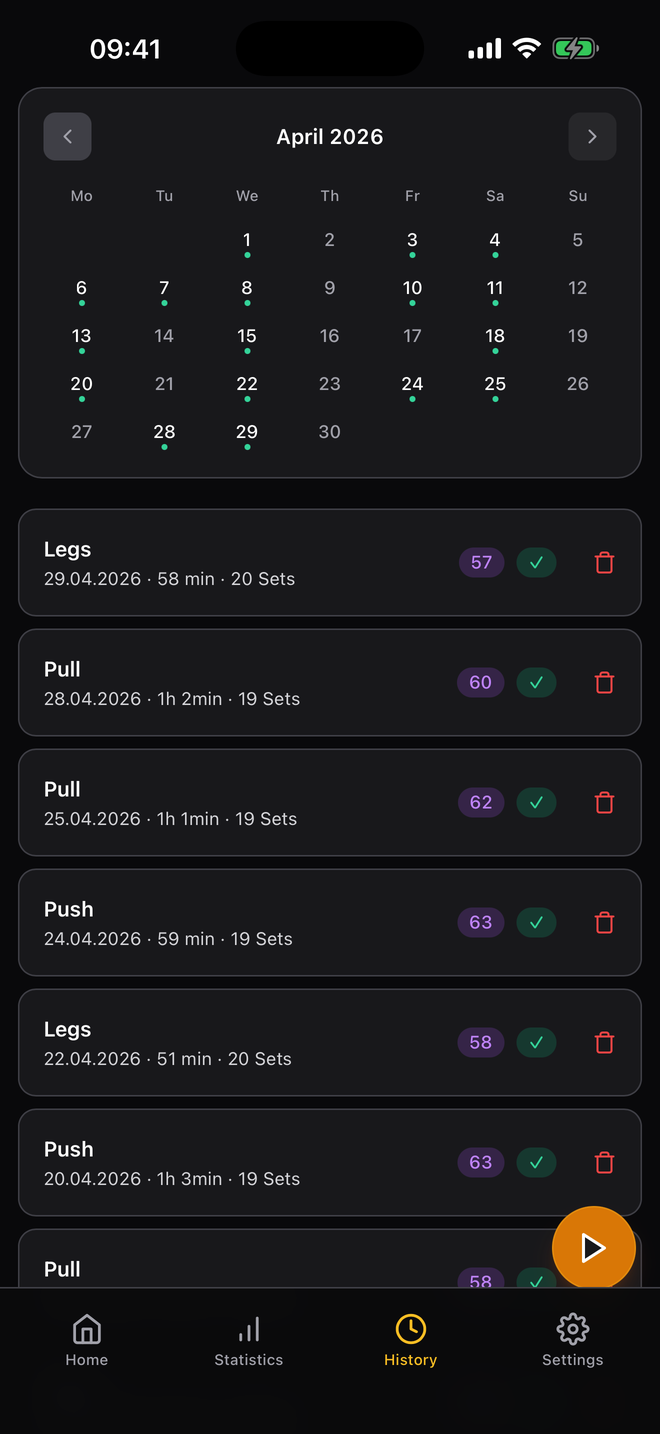
Workout history with calendar
Exercise detail with e1RM trend
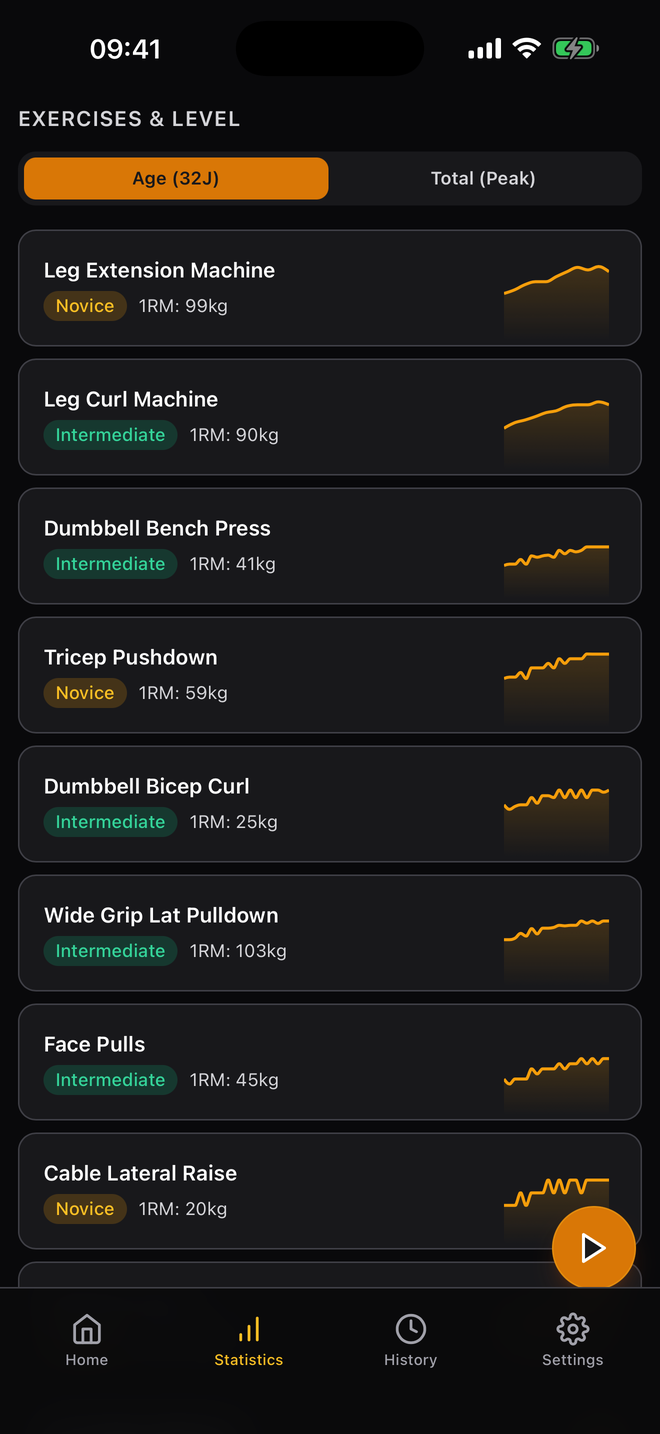
Per-exercise level overview
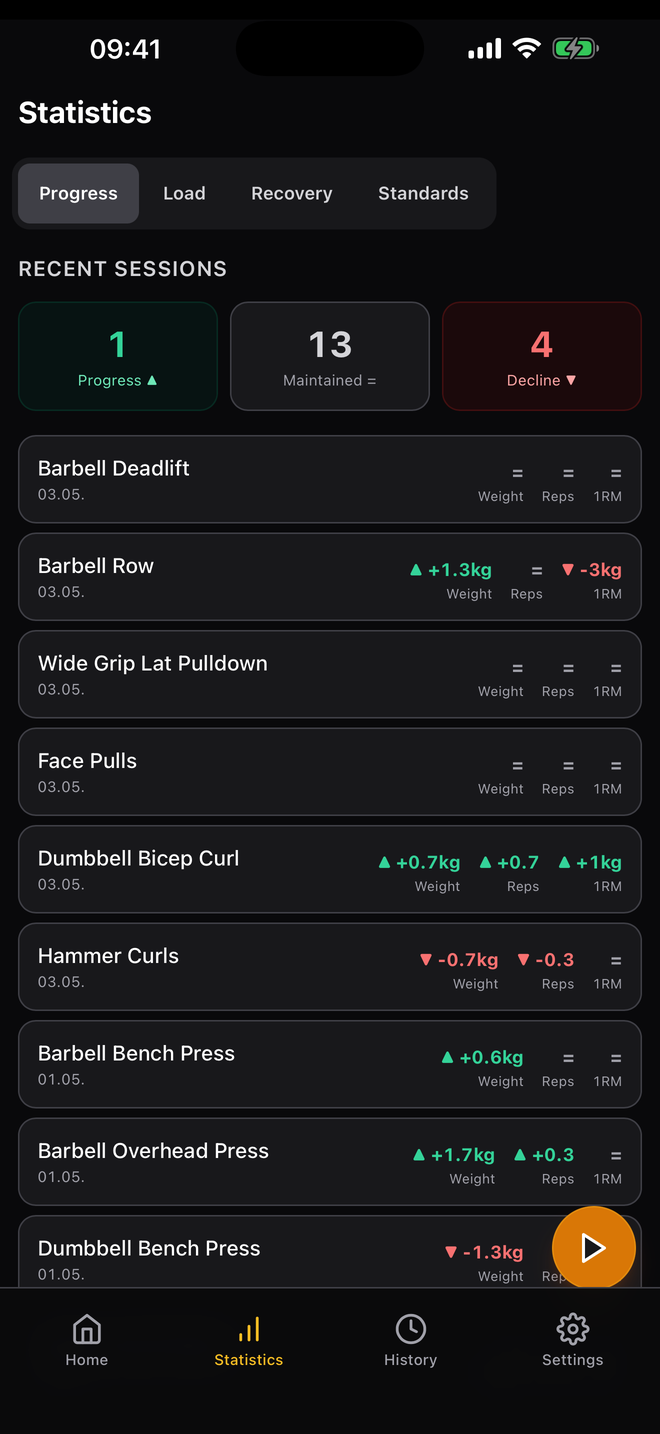
Recent sessions progress tracking

Local. Private. Yours.

Your training data is yours. Period.

Iron Progress runs entirely on your iPhone. Workouts, exercises, plans, profile: they live in your device's storage and stay there. There is no Iron Progress server. There is no account. There is nothing for anyone to leak.

No tracking, no SDKs

Zero analytics tools. Zero ads. Zero third-party data-collection libraries, not even crash reporting.

No account required

No email, no password, no sign-up. Install, train, done.

iCloud sync, only if you ask

Off by default. When you turn it on, it goes through your own iCloud, not ours. Switch off any time.

Export & delete, instantly

JSON export with one tap. Wipe everything from Settings. Uninstall = total data removal.

Apple HealthKit and iCloud sync are the only optional integrations. Both are opt-in, both stay between you and Apple, and both can be revoked in iOS Settings at any time. Subscriptions go through Apple StoreKit. Iron Progress only ever sees the transaction status, never your payment data.

Read the full privacy policy
JB

From the maker

Jürgen Brischar

Dillingen, Germany

I'm a licensed fitness trainer. I built Iron Progress because I wanted to track my own progress and adjust my training based on what my body was actually doing. With scientific foundations where they apply, and judgment where they don't. None of the apps I tried really convinced me. So I built the one I'd want to use.

Pricing

Free forever. Pro when you want depth.

The free version logs everything: sets, RIR, history, volume bars per muscle. Pro adds the deeper analytics, the coaching, the iCloud sync.

Free

€0 forever

Everything you need to log workouts seriously.

  • 102 built-in exercises + custom exercises
  • Workout templates (Full Body, Upper/Lower, PPL)
  • RIR, drop sets, myo-reps, supersets
  • Warm-up calculator & rest timer with audio
  • Volume bars per muscle (MEV/MAV/MRV)
  • Strength standards & PR detection
  • Apple HealthKit integration
14-DAY FREE TRIAL

Iron Progress Pro

€29.99 /year

or €3.99 / month · cancel any time

Deeper analytics, smart coaching and iCloud sync across all your Apple devices.

Deeper analytics

  • WRSI trend & history filters
  • Volume trend & muscle radar
  • Exercise deep-dive: history, sets, PR breakdown

Smart coaching

  • Automatic progression suggestions
  • Deload advisor & fatigue timeline

Multi-device

  • iCloud sync across all Apple devices
Start 14-day free trial

FAQ

Where is my data stored?

+

In your iPhone's local storage. Nothing is uploaded to an Iron Progress server because there is no Iron Progress server. If you turn on iCloud Sync (Pro), data is synced through Apple's CloudKit into your private iCloud database. Only your Apple ID can access it.

Do I need to create an account?

+

No. There's no signup, no email, no password. Install, finish a 30-second onboarding, train.

What's free vs. Pro?

+

The full logging engine is free: sets, RIR, drops, supersets, myo-reps, plate calc, history, strength standards, volume bars per muscle, PR detection, HealthKit. Pro adds deeper analytics (WRSI trends, exercise deep-dive, volume radar), smart coaching (progression suggestions, deload advisor, fatigue trend) and iCloud sync across all your Apple devices.

Where does WRSI come from?

+

WRSI (Workout Relative Strength Index) is computed locally from your sets and your historical bests. The strength standards behind it are sourced from established literature — Rippetoe, NSCA, Saeterbakken, Contreras, McGuigan, Hughes, Miller — adjusted for your age and bodyweight.

Can I export my data if I leave?

+

Yes. Settings → Data → Export. You get a complete JSON file with your workouts, exercises, templates and profile. Re-import is non-destructive: a preview shows what changes, and there's an undo card if you change your mind.

Does Iron Progress work without internet?

+

Yes. The app is fully offline-capable. Internet is only needed for App Store purchases and (optional) iCloud sync.

Ready when you are.

14-day Pro trial. Cancel any time. Your data stays on your iPhone.